Metal related notes
Target of this note
The target of this note is to have a overview introduction for those who does not have experience in metal. This will not only includes the concepts of how metal works but also the introduction of what the framework.
Overview
For those who don’t know what is the difference between CPU and GPU, it would be better to read this article first.
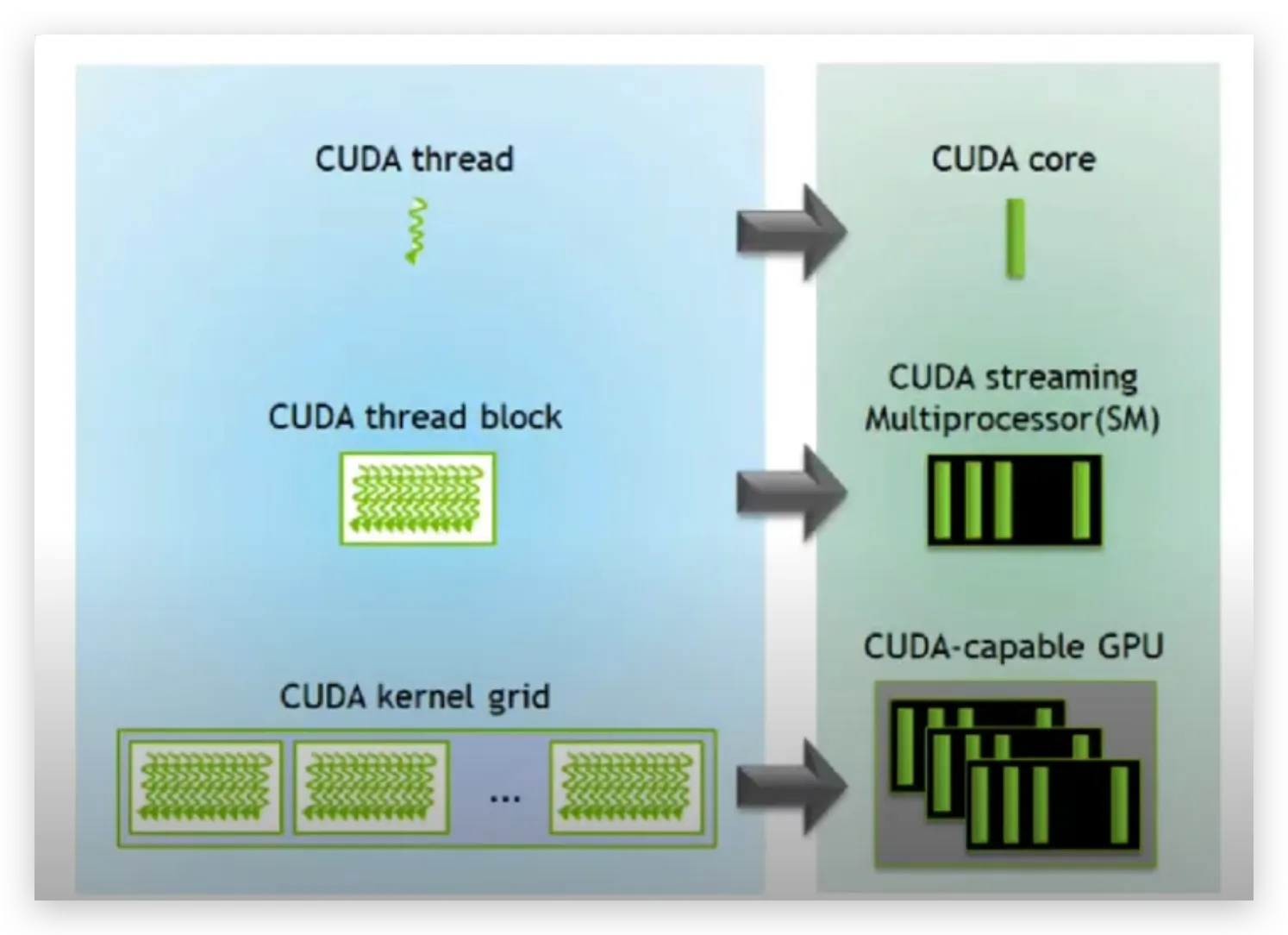
Metal is the API that apple use to accelerate their GPU. Just like cuda, metal is also using the structure of SIMT (Single Instruction Multiple Threads) model.This model reflects the fundamental but important concept in GPU — parallelism. When a GPU function (kernel) is executed, thousands to millions of psuedo-independent instances (called threads) of the kernel are executed parallelly.
Metal Shading Language (MSL)
This is the Objective-C language that metal provides to call the API to run the kernels or to mange the resources between CPU and GPU.
Threads
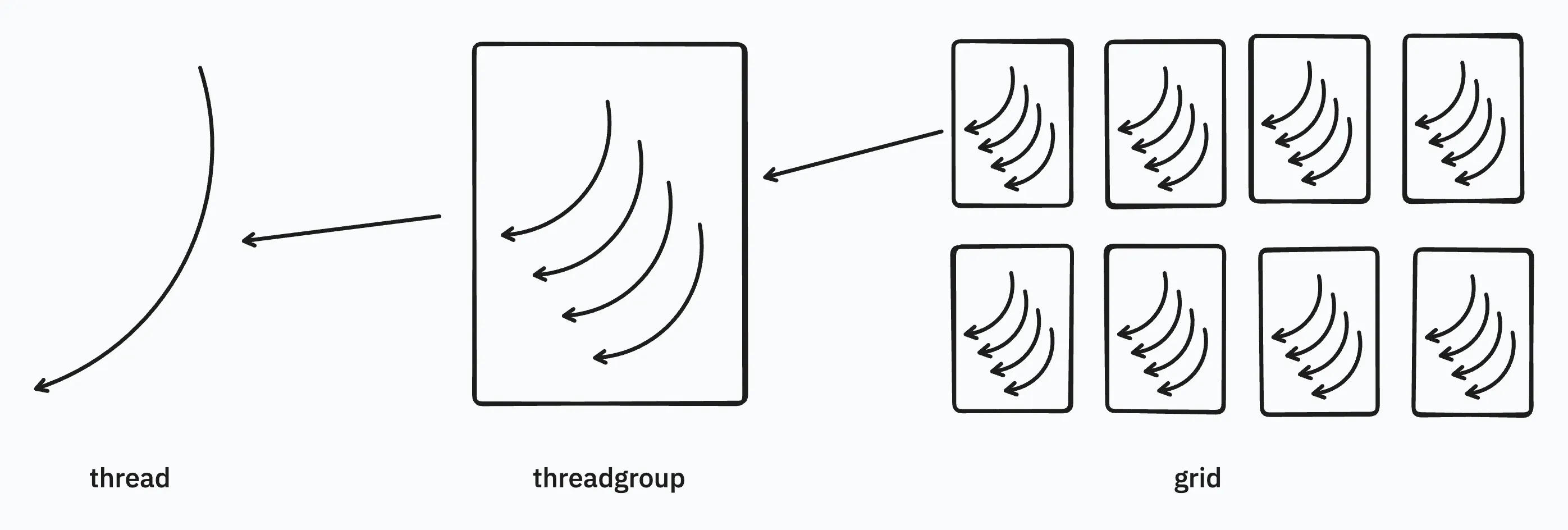
In Metal, the hierarchy of threads is:
- Thread: the single execution unit of the kernel
- The position of thread can be accessed using
[[thread_position_in_threadgroup]][[thread_position_in_grid]]
- The position of thread can be accessed using
- Threadgroup: A collection of threads that shares a common block & synchronization.
- The threads in the same threadgroup share a common block of memory.
- The position of threadgroup can be access using
[[threadgroup_position_in_grid]]
- SIMD group/ Warp: thread in threadgroups are organized in SIMD (single-instruction, multiple-data) groups.
- The threads in a SIMD group execute the same code.
- Grid: A collections of threadgroups.
- grid can be 1D, 2D (dealing with image), 3D
The maximum of the threads can be used in threadgroup is related to the hardware (use device.max_threads_per_threadgroup to check).
[[thread_position_in_grid]]==thread_position_in_grid * threads_per_threadgroup + thread_position_in threadgroup
All in all, we can simply conclude that: The basic unit in metal is a thread. Multiple threads consists of a thread group (warp/block in cuda). Several thread groups makes a grid.
How many threads can I use in a thread group?
According to this, you can have 512 or 1024 threads in a thread group depends on the device you use.
The GPU hardware is split up into several SIMD groups. If threadExecutionWidth is 32 and the maxThreadsPerThreadgroup is 512, that means there are 512/32=16 of these SIMD groups in the hardware and each of these SIMD groups can run 32 threads at a time. The GPU will decide which group of 32 threads to schedule in which SIMD group -- as a developer you have no control over this. Actual hardware details are unpublished by Apple, so exactly how the GPU works is mostly guesswork.
Or using device.max_threads_per_threadgroup to get the max threads of your device.
Does threadgroup in MSL run sequentially?
No, it always run in parallel. (reference)
Equivalence of threads between cuda and metal shader
| CUDA | Metal Shading Language |
|---|---|
| threadIdx | thread_position_in_threadgroup |
| blockIdx | threadgroup_position_in_grid |
| blockDim | threads_per_threadgroup |
| gridDim | ? |
| ? | thread_position_in_grid |
| ? | simdgroup_index_in_threadgroup |
| ? | thread_index_in_simdgroup |
| warpSize | simdgroup_size() |
| __syncthreads | threadgroup_barrier() |
| cudaDeviceSynchronize() | command_buffer.wait_util_completed() |
Components needed to execute metal kernels
Device
Metal device is a abstraction of your GPU machine in code. Different Apple machine have different limitation and features based due to the difference of the hardware. You can see the Metal Feature Set Tables to check out the machine you’re using.
Buffer
Buffers act as the bridge between CPU and GPU. It is a block of memory that can be shared between CPU and GPU. It’s used to store data that the shader will process or that will hold the results of the computation.
Pipeline State
The compute pipeline state defines how your kernel (computing shader) will be executed. This is usually related to the kernel name. → The pipeline state is basically all the code written in Metal Shader Language (MSL), which provides all the necessary steps/ commands/ instructions for the GPU to execute.
The commands is just like the instructions in CPU, which specifies what the GPU should do.
Command Encoder
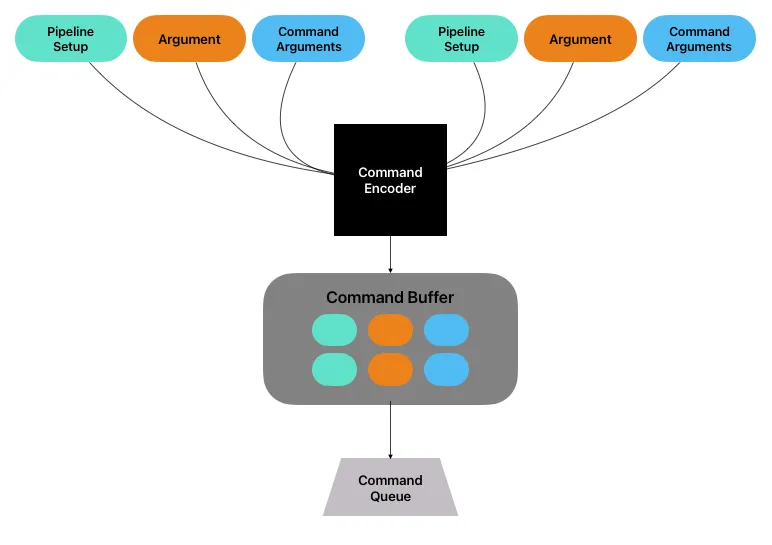
A command encoder is used to encode GPU commands into a command buffer. After the pipeline state and arguments (buffers) are set up (i.e., we chose a pipeline state and allocate buffers for input and output), a command buffer would take all of them, create a package that will be executed on the GPU. These packages are sent into command buffer.
Command Buffer
creation / storage of computational kernel packages ( commands + arguments)
The packages encoded by command encoder is sent into command buffer. These buffers stores the functions/computations that we want to execute.
Command Queue
Execution of kernels (FIFO)
Those packages stored in command buffer will be push into command queue. The reason why it is called queue is that the executing order is FIFO.
A simple example
if we have two -length arrays, and , and we want to compute the addition of each element of the 2 arrays, and store the result in an array , where the code be like:
int main() {
    constexpr size_t SIZE = 10000;
    uint a[SIZE] = {1, 2, 3,..., 9999, 10000};
    uint b[SIZE] = {2, 4, 6,..., 19998, 20000};
    uint c[SIZE];

		for (int i = 0; i < 10000; i++) {
			c[i] = a[i] + b[i];
		}
}
To parallelize this, we can write the kernel:
kernel void two_array_addition(
    constant uint* input_a [[buffer(0)]],
    constant uint* input_b [[buffer(1)]],
    device uint* output_c [[buffer(2)]],
    uint idx [[thread_position_in_grid]]
) {
    output_c[idx] = input_a[idx] + input_b[idx];
}
Executing kernel from rust
This repo is a template that integrates metal-rs and building script, enable us to execute kernels on metal shader through rust code.
Compile
To execute the kernel, we have to compile the metal shaders into .metallib file, which is the binary of the code. This process is completed in the cargo building process (see two-array-addition/build.rs). Therefore, by running cargo build, the shaders.metallib will be generated in the build folder.
Executing Kernel
This is an example of how kernel is called from rust wrapper.
fn execute_kernel(name: &str, input_a: &[u32], input_b: &[u32], output_c: &[u32]) -> Vec<u32> {
    assert!(input_a.len() == input_b.len() && input_a.len() == output_c.len());

    let len = input_a.len() as u64;

    // 1. Init the MetalState
    let state = MetalState::new(None).unwrap();

    // 2. Set up Pipeline State
    let pipeline = state.setup_pipeline(name).unwrap();

    // 3. Allocate the buffers for A, B, and C
    let buffer_a = state.alloc_buffer_data::<u32>(input_a);
    let buffer_b = state.alloc_buffer_data::<u32>(input_b);
    let buffer_c = state.alloc_buffer_data::<u32>(output_c);

    let mut result: Vec<u32> = vec![];

    autoreleasepool(|| {
        // 4. Create the command buffer & command encoder
        let (command_buffer, command_encoder) = state.setup_command(
            &pipeline,
            Some(&[(0, &buffer_a), (1, &buffer_b), (2, &buffer_c)]),
        );

        // 5. command encoder dispatch the threadgroup size and num of threads per threadgroup
        let threadgroup_size = MTLSize::new(len, 1, 1);
        let num_threads_per_threadgroup = MTLSize::new(1, 1, 1);

        command_encoder.dispatch_threads(threadgroup_size, num_threads_per_threadgroup);

        command_encoder.end_encoding();

        command_buffer.commit();
        command_buffer.wait_until_completed();

        // 6. Copy the result back to the host
        result = MetalState::retrieve_contents::<u32>(&buffer_c);
    });

    result
}
By calling this function, we are able to call a kernel in rust:
fn main() {
    const SIZE: u32 = 1 << 26;
    // input_a = [1, 2, 3, ..., 2^{30}]
    // input_b = [2, 4, 6, ..., 2 * 2^{30}]
    let input_a = (1..SIZE).collect::<Vec<u32>>();
    let input_b = input_a.clone().iter().map(|x| x * 2).collect::<Vec<u32>>();

    let output_c = vec![0; (SIZE - 1) as usize];
    let expected_output = (1..SIZE).map(|x| x + x * 2).collect::<Vec<u32>>();

    let result = execute_kernel("two_array_addition", &input_a, &input_b, &output_c);
    let result_alias = execute_kernel("two_array_addition_alias", &input_a, &input_b, &output_c);

    assert_eq!(result, expected_output);
    assert_eq!(result_alias, expected_output);
}
What is shared memory?
The shared memory in GPU is a fast, on-chip memory that can be accessed by all threads within a threadgroup. This is equivalent to shared memory in CUDA and local memory in OpenCL.
In MSL, it is using address space: threadgroup
e.g.,
kernel void foo_kernel(threadgroup int* arr[[ threadgroup(0) ]]) {
	//...
}
In metal-rs / Rust side we need to set it into the command_buffer:
let shared_memory_bytes = 4 * 100; // array: u32[100]
command_encoder.set_threadgroup_memory_length(0, shared_memory_bytes);
Reducing Shader Bottlenecks
https://developer.apple.com/documentation/xcode/reducing-shader-bottlenecks
kernel launching takes time (but we need to verify this, I will ask the forum in Apple developer)
- Metal Shader compiles “just-in-time”, this might cause hundreds of milliseconds to compile: link
Great resources
Documents
- Metal Feature Set Table: to see what your device have (i.e., limitations) for metal.
- Performing Calculations on a GPU: a simple introduction to MSL.
- visualized threads & threadgroup
Optimization
Articles
Debugging
- MSL debugger reference
- When is a
simdgroup_barrier()required (versusthreadgroup_barrier) - Barrier
Github
Something similar but in CUDA
- Intro to CUDA: a basic video introducing what and how to develop on GPU
- CUDA programming
- Cuda from scratch
- cuda-c++-programming